我们要实现这种效果
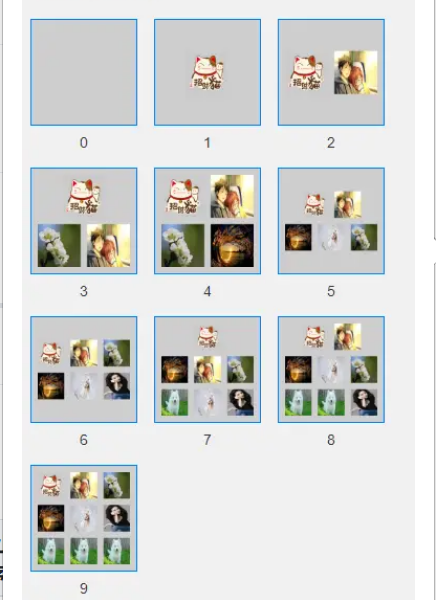
首先用使用HBuilderX导入插件

接着在uni_modules包下面会得到一这个这样的文件,我们要用到的是这个js文件
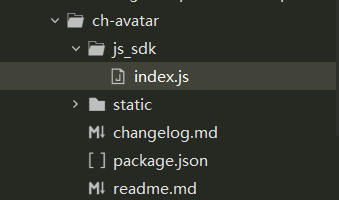
导入js
js
import createAvatar from '@/uni_modules/ch-avatar/js_sdk/index.js';
准备好你需要操作的图片
js
let imgs = [										'https://img0.baidu.com/it/u=3101694723,748884042&fm=26&fmt=auto&gp=0.jpg',		'https://img2.baidu.com/it/u=3566088443,3713209594&fm=26&fmt=auto&gp=0.jpg',
'https://img1.baidu.com/it/u=1361135963,570304265&fm=26&fmt=auto&gp=0.jpg',		'https://img1.baidu.com/it/u=2496571732,442429806&fm=26&fmt=auto&gp=0.jpg',
	//这个链接是错的,为了体现获取图片错误时会获取本地默认图片
'https://img2.baidu.com/it/u=4247656867,4135832390&fm=11&fmt=auto&gp=0.jpg',
]
然后将值传入
js
let res = await createAvatar({
	canvasId: this.canvasId,
	data: imgs
})
完整代码
js
## 基本用法
```html
<template>
	<view>
		<button type="primary" @tap="cerate">创建群组头像</button>
		<canvas :canvas-id="canvasId" style="width: 120px; height: 120px; margin: 36px auto;"></canvas>
	</view>
</template>

<script>
	import createAvatar from '@/uni_modules/ch-avatar/js_sdk/index.js'
	export default {
		data() {
			return {
				canvasId: 'canvas'
			}
		},
		onLoad() {},
		methods: {
			async cerate() {
				let imgs = [
					'https://img0.baidu.com/it/u=3101694723,748884042&fm=26&fmt=auto&gp=0.jpg',
					'https://img2.baidu.com/it/u=3566088443,3713209594&fm=26&fmt=auto&gp=0.jpg',
					'https://img1.baidu.com/it/u=1361135963,570304265&fm=26&fmt=auto&gp=0.jpg',
					'https://img1.baidu.com/it/u=2496571732,442429806&fm=26&fmt=auto&gp=0.jpg',
					//这个链接是错的,为了体现获取图片错误时会获取本地默认图片
					'https://img2.baidu.com/it/u=4247656867,4135832390&fm=11&fmt=auto&gp=0.jpg',
					'https://img0.baidu.com/it/u=3438413553,834879777&fm=26&fmt=auto&gp=0.jpg',
					'https://img2.baidu.com/it/u=3681880960,455182084&fm=26&fmt=auto&gp=0.jpg',
					'https://img2.baidu.com/it/u=3681880960,455182084&fm=26&fmt=auto&gp=0.jpg',
					'https://img2.baidu.com/it/u=3681880960,455182084&fm=26&fmt=auto&gp=0.jpg',
				]
				let res = await createAvatar({
					canvasId: this.canvasId,
					data: imgs
				})
				console.log(res);
			}
		}
	}
</script>
启动方式
- 属性isShow被赋值为true
this.$refs.myDTPicker.show()
属性
| 属性 | 描述 | 类型 | 默认值 |
|--|--|--|--|
| canvasId| canvas的canvas-id | String | canvas|
| data| 图片集合 | Array| [] |
| width| 生成图片的宽度,默认高度等于宽度 | Number | 120 |
| bgColor| 生成图片的背景色 | String | #cecece |
| gutter| 图片中间间距 | Number | 6 |
| margin| 图片边距 | Number | 6 |
text